Introduction:

ASP.NET is a Programming Framework developed by Microsoft for building powerful Web Applications. ASP.NET has built-in support for three languages: Visual Basic (VB), C Sharp (C#) and Java Script. You can install support for other .NET compatible languages as well.
Versions:
The ASP.NET Framework is supported on Windows 2000 and Windows XP. ASP.NET applications will run on IIS 5.0 for these Operating Systems.Web Services is supported on all platforms supported by the Microsoft.NET Framework SDK, except Windows 95. Windows XP, Windows2000, Windows NT 4 with Service Pack 6a, Windows ME, Windows 98, Windows 98 SE and Windows 95 all support the Microsoft .NET Framework SDK.
Migration from ASP to ASP.NET:
Simple ASP pages can easily migrated to ASP.NET applications. ASP.NET offers complete syntax and processing capability with ASP applications. Developers need to simply change file extensions from .asp to .aspx to migrate their files to ASP.NET Framework. They can also easily add ASP.NET functionality to their applications with ease.
Tools:
Microsoft designed ASP.NET to work with HTML editors and other Programming tools. We can also use a simple text editor like Notepad. Microsoft Visual Studio.NET gives you more support from your development environment for coding. It enables you to take advantage of other features such as GUI support of drag and drop Server Controls and debugging support.
Web Forms:
ASP.NET web Forms gives you ability to create Web Pages on the .NET platform. They enable you to program against your controls that you put on your web Pages. you can either use a Server Control that is built into ASP.NET or create your own Custom Server Controls. These Server Controls are used for controlling HTML tags on a Web Page. By using Web Forms, you can build user interface code as effectively as your Business Services Code, reusing and packing th code in a well designed manner.
Web Servers:
ASP.NET and ASP 30.(previous version), both will work on Internet Information Services(IIS) 5.0 with Windows 2000 and Windows XP. If you use Windows 95,98, ME, or NT and you want to run ASP.NET Applications, you can install Windows NT, or XP in addition to your Operating System by creating a dual-boot machine.
Web Services:
ASP.NET Web Services gives you ability to access the Server functionality. Using Web Services, business people can explore their data and/ or component libraries which in-turn can be obtained and manipulated client and server applications. web Servers enable the exchange of data in client-server or server-server scenarios, using standards like HTTP and XML to move the data across the firewalls. Web Services are not tied to a particular component technology or object-calling convention. As a result, programs written in any language, using any component model, and running on any operating system can access web Services.
State and Application:
ASP.NET provides a simple framework that enables Web developers to write logic that runs the applications level. Developers can write this code in either global.asax file or in compiled class. This logic includes application level events, but developers can easily extend this framework to meet the need of their Web Application. ASP.NET code, written in global.asa file is supported in AS.NET. You can simply rename the global.asa to global.asax when upgrading from ASP.
Data Access:
Accessing databases from the ASP.NET application is a common technique for displaying dynamic information for the website visitors. ASP.NET makes it easier than ever to access databases for this purpose and provides for managing the data in the database.
Performance:
A big difference between ASP.3.0 and ASP.NET is how your code is run on the server. With ASP.NET, your code is compiled into executable classes. With ASP.3.0, code often needs to be interpreted. With ASP.3.0, any server-side code is most likely going to have to be interpreted by the Web Server, unless it is cached. To avoid interpreted code in ASP 3.0, you need to put the code into a COM component.
Configuration:
ASP.NET configuration settings are stored in XML- based files, which are text files easily accessible for reading and writing. Each of your application can have a distinct configuration file. You can extend the Configuration Scheme to meet the requirements.
Power and Security:
With ASP.NET, you can access Common Language Runtime (CLR). Running on the CLR gives access to many of the featured in the .NET Framework, such as Debugging, Security, Data Access, Language Interoperability and more.
The .NET Framework and ASP.NET provides default Authorization and Authentication schemes for Web Applications. You can easily remove, add to or replace these schemes depending upon the needs of your application.
ASP.NET Architecture:
ASP.NET is based on the fundamental Architecture of of .NET Framework. Visual Studio provide a uniform way to combine the various features of this Architecture.
In the following discussion, Architecture is explained from bottom to top.
1. At the bottom of the Architecture, there is Common Language Runtime(CLR). .NET Framework Common Language Runtime resides on the top of the Operating System Services. The Common Language Runtime loads and executes code that targets the Runtime. This code is therefore called Managed Code.
2. .NET Framework provides a rich set of class libraries. These include Base Classes, like Networking and input/output classes, a Data Class library for Data access for use by Programming tools such as Debugging Services. All of them are bought together by the Services Framework which exists on the top of the Common Language Runtime(CLR).
3. ADO.NET is Microsoft's ActiveX Data Object(ADO) model for the .NET Framework. ADO.NET is not simply the migration of the popular ADO model to the managed environment but a completely new paradigm for Data access and manipulation.
ADO.NET is intended Specifically for developing web Applications. This is evident from its two major design principles:
a) Disconnected Datasets- In ADO.NET, almost all data manipulation is done outside the context of an Open Database Connection.
b) Effortless Data Exchange with XML- Datasets can converse in the universal data format of the Web, namely XML.

4. The fourth layer of the Framework consists of the Windows Application Model and in parallel, the Web Application Model.
The Web Application Model- in the slide presented as ASP.NET- includes Web Forms and Web Services. ASP.NET comes with built-in Web Forms Controls, which are responsible for generating the user interface. they mirror typical HTML widgets like Text Boxes and Buttons. If these controls do net meet your needs, you are free to create your own User Controls.
Web Services brings you a model to bind different applications over the internet. This model is based on existing infrastructure and applications and is therefore standard-based, simple and adaptable.
Web Services are software solutions delivered via internet to any device. Today, that means Web Browsers on computers, for the most part, but this device-agnostic design of .NET will eliminate this limitation.
5. One of the obvious themes of .NET is Unification and Interoperability between various programming languages. In order to achieve this, certain rules must be laid and all the languages must follow these rules. In other words, we cannot have languages running around, creating their own extensions and their own fancy new data types. Common Language Specification(CLS) is collection of the rules and constraints that every language must follow.
6. The CLR and the .NET Framework in general, however, are designed in such a way that code writen in one language can not only seamlessly be used by another language. Hence ASP.NET can be programmed in any of the .NET compatible language whether it is VB.NET, C#, Managed C++ or JScript.NET.
ASP.NET Life Cycle:
ASP.NET life cycle involves the following Events:
- PreInit: PreInit is the first event in page life cycle. It checks the IsPostBack property and determines whether the page is a postback. It sets the themes and master pages, creates dynamic controls and gets and sets profile property values.This event can be handled by overloading the OnPreInit method or creating a page preInit Handler.
- Init: Init event initializes the control property and the control tree is built. This event can be handled by overloading the OnInit method or creating a pageInit Handler.
- InitComplete: InitComplete event allows tracking of view state. All the controls turn on view state tracking.
- LoadViewState: LoadViewState event allows loading view state information into the controls.
- LoadPostData: During this phase, the contents of all the input fields defined with in the "<form>" tag are processed.
- PreLoad: PreLoad occurs before the postback data is loaded in the controls. This event can be handled by overloading the OnPreLoad method or creating a page PreLoad Handler.

- Load: The Load event is raised for the page first and then recursively for all other controls. This event can be handled by overloading the OnLoad method or creating a PageLoad Handler.
- LoadComplete: The loading process is completed, control event handlers are run and page validation takes place. This event can be handled by overloading the OnLoadComplete method or creating a PageLoadComplete Handler.
- PreRender: The PreRender event occurs just before the output is rendered. By handling this event, pages and controls can perform any updates before the output is rendered.
- PreRenderComplete: As the PreRender event is recursively fired for all controls, this event ensures the completion of the PreRendering page.
- SaveStateComplete: State of control on the page is saved. Personalization, control state and view state information is saved. The HTML markup is generated. This stage can be handled by overriding the Render method or by creating a PageRender Handler.
- Render: Render is not an event. It is a method called to generate the output to send to the client.This method writes out the control's markup to send to the browser.
- UnLoad: The UnLoad phase is the last phase of the ASP.NET page life cycle. It raises the unload event for all controls and finally to the page itself. Final cleanup is done and all resources and references, such as database connections, are free. This event can be handled by modifying the OnUnLoad method or by creating a PageUnLoad Handler.
Event Handling in ASP.NET:
Event:
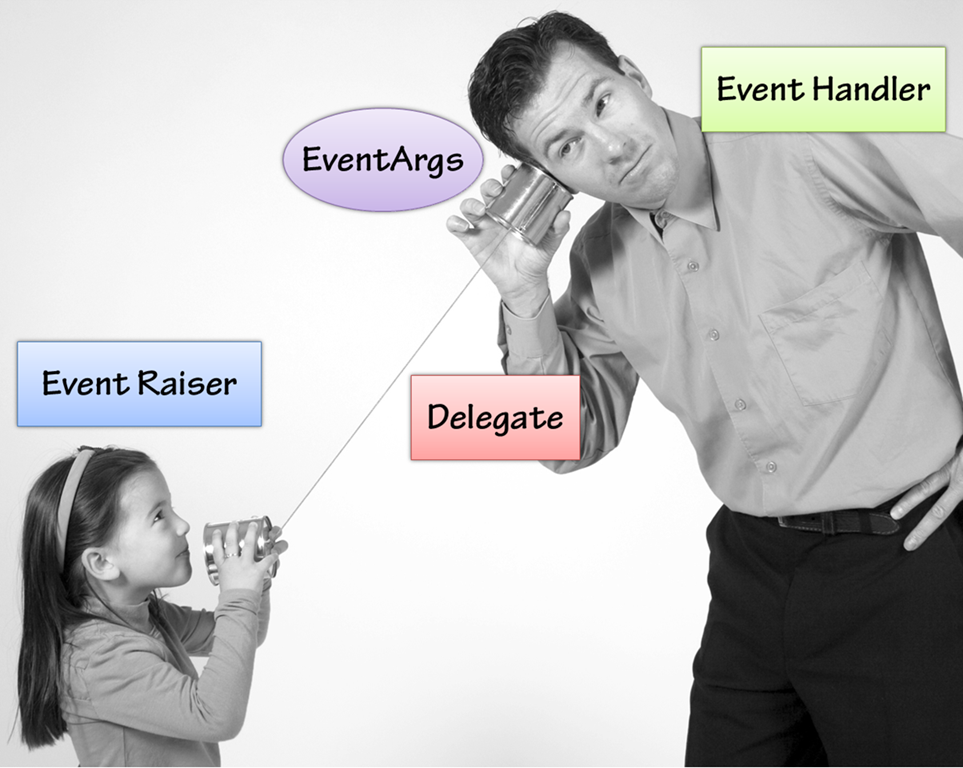
Event is an action or occurrence like mouse click or key press or mouse movements or any system generated notification. The process communicates through Event. For example, Interrupts are system generated events. When events occur, the application should be able to respond it.
In ASP.NET, an event is raised on the client, and handled in the server. For example, a if user clicks a button displayed in the browser, then 'click' event is raised. The browser handles this client-side event by posting it to the server.
The server has a subroutine describing what to do when the event is raise. It is called the "Event Handler" .
Therefore, when the event message is transmitted to the server, it checks whether the click event has an associated event handler, and if it has, then the Event Handler is executed.
Event Arguments:
ASP.NET Event Handler, generally take two parameters and return void. The first parameter is the 'object' (which is raising the event) and the second parameter is the 'Event Argument'.
Syntax of an Event:
private void EventName (object sender, EventArgs e);
Application and Session Events:
The most important Application Events are
- Application_Start: It is raised when the Application or Website is started.
- Application_End: It is raised when the Application or Website is stopped.
- Session_Start: It is raised when the Session is started (i.e, when the user sends the first request to the page from the Application).
- Session_End: It is raised when the Session ends.
Most commonly used Page and Control Events are
- Data Binding: It is raised when a Control bind to a Data Source.
- Disposed: It is raised when a Page or Control is released.
- Error: It is raised when an Unhandled Exception is thrown.
- Init: It is raised when the Page or Control is initialized.
- Load: It is raised when the Page or Control is loaded.
- PreRender: It is raised when the Page or Control is to be rendered.
- Unload: It is raised when the Page or Control is Unloaded from the memory.
Event Handling using Controls:
All ASP.NET controls are i,implemented as classes, and they have events which are fired when user performs certain action on them. For Example, when a user clicks a button, the 'Click' event is generated. For handling these events, there are Built-In Attributes and Event Handlers. To respond to an event, the 'Event Handler' is coded.
By default, Visual Studio creates an Event Handler by including a 'Handles Clause' on the Sub Procedure.
This clause names the control and event that the procedure handles.
Event coded with a Handles Clause
asp tag for the Button Control
<asp:Button ID="btnCancel" runat="server" Text="Cancel"/>
The event Handler for the Click Event
Protected Sub btnCancel_Click(ByVal sender As Object,
ByVal e As System.EventArgs)
Handles btnCancel.Click
End Sub
Event coded without a Handled Clause( Here the Handler must be named according to the appropriate Event Attribute of the Control).
asp tag for the Button Control
<asp:Button ID=:btnCancel" runat="server" Text="Cancel"
OnClick="btnCancel_Click"/>
The Event Handler for the Click Event
Protected Sub btnCancel_Click(ByVal sender As Object,
ByVal e As System.EventArgs)
End Sub
The Common Control Events are
| Event | Attribute | Controls |
|---|---|---|
| Click | OnClick | Button, image button, link button, image map |
| Command | OnCommand | Button, image button, link button |
| TextChanged | OnTextChanged | Text box |
| SelectedIndexChanged | OnSelectedIndexChanged | Drop-down list, list box, radio button list, check box list. |
| CheckedChanged | OnCheckedChanged | Check box, radio button |
Some Events cause the form to be posted back to the server immediately. These are called the "PostBack Events". For Example, the Click Events like Button.Click. Some Events are not posted back to the server immediately. These are called "Non-PostBack Events". For Example, Change Events and Selection Events such as TextBox.TextChanged or CheckBox.CheckedChanged. The Non-PostBack Events could be made to postback immediately by setting their AutoPostBack property to True.
Default Events:
The Default Event for the Page Object is the Load Event. Similarly, every control has a default Event. For Example, Default Event for the Button Control is Cilck Event.
The Default Event Handler could be created in Visual Studio, just by double clicking the control in Design View. The following table shows some of the Default Events for Common Controls:
| Control | Default Event |
|---|---|
| AdRotator | AdCreated |
| BulletedList | Click |
| Button | Click |
| Calender | SelectionChanged |
| CheckBox | CheckedChanged |
| CheckBoxList | SelectedIndexChanged |
| DataGrid | SelectedIndexChanged |
| DataList | SelectedIndexChanged |
| DropDownList | SelectedIndexChanged |
| HyperLink | Click |
| ImageButton | Click |
| ImageMap | Click |
| LinkButton | Click |
| ListBox | SelectedIndexChanged |
| Menu | MenuItemClick |
| RadioButton | CheckedChanged |
| RadioButtonList | SelectedIndexChanged |

No comments:
Post a Comment